Rethinking Peak Season: Why Static Headcount Fails in Q4 (And What to Do Instead)
Build a more agile Q4 labor strategy by sizing seasonal hiring to baseline demand and using on-demand labor for daily spikes, gaps, and surges.


You're ready to get started with on-demand labor. This guide covers everything you need, from creating your account to building a labor pool that gives your operation true flexibility. If you'd prefer to talk to someone on our team first, submit an inquiry and we'll reach out to walk through it with you.
An on-demand labor pool is a network of independent workers who can be brought in as needed, and who become increasingly familiar with your operation over time.
Think of it like a sports team's sideline bench. Your core full-time employees are the starters on the field. Your labor pool is a trained group of workers on the sideline who already know the playbook, the pace, and the expectations. When demand spikes, a bottleneck hits, or someone calls out last minute, you pull from the bench. No scrambling, no slow onboarding, no loss of momentum.
Rather than constantly hiring, onboarding, and letting people go, you build this bench intentionally: a dependable set of workers who know your processes and can step in seamlessly. Your full-time team remains your core, and your labor pool becomes a reliable, trained extension of that team ready whenever the situation calls for it.
Before you post a single op, it helps to know how we work. We don't hand you a login and wish you luck. Our team has decades of hands-on experience in manufacturing, warehousing, logistics, and supply chain. They've faced the same operational challenges you're dealing with now, which means they understand your situation at a level that goes beyond the platform itself.
Every operation is different, so we start by understanding yours: your facility, your workflows, and where your labor challenges actually live. From there we help you identify where on-demand labor fits and recommend a starting approach specific to your operation. We're there every step of the way to support your operation and make sure you're set up for success. As you expand on-demand labor into new areas, we're there to help you think through the next steps.
There are no signup fees, membership costs, or long-term contracts. Setup is straightforward and you're in control the entire time.
Step 1: Create your business profile (5 minutes) Go to company.veryableops.com/create-profile and enter your company details, facility location, and payment information.
Step 2: Tour the portal (15 minutes) Once you're in, a guided walkthrough covers the basics: posting work, reviewing workers, and managing ops. There are tutorial videos and a live support chat if you get stuck.
Step 3: Post your initial ops (15 minutes) An op is a single shift posting on the Veryable platform. You set the work area, date and time, headcount, pay rate, and any specific requirements such as certifications or equipment. When you're ready, post it.
Your initial ops serve a specific purpose beyond filling a shift: they're how you get workers into your building, evaluate them in action, and start identifying who belongs in your labor pool. We recommend starting with lower-complexity tasks — assembly, kitting, packaging, sorting, or general warehouse work — but the platform supports everything from general labor to machining, welding, engineering, and inspection. The operator depth is there when you need it.
Step 4: Review and accept bids (10 minutes) After posting your op, get back into the portal and accept bids from operators who want to work with you. Most businesses receive bids within hours, sometimes within minutes, and it’s generally best to accept bids soon after they are placed. Start by reviewing each operator’s proximity to your location, then check their reliability rating, skills & experience, and performance ratings from companies they’ve worked with in the past. Select the workers that fit and accept. Once you approve a bid, the worker is notified and confirms they will attend.
In most markets, posting an op 24 hours before start time gives you a strong chance of filling it. For best results, posting 24 to 48 hours in advance gives more operators time to see and bid on your op, which means more options to choose from. Once you’ve built a robust labor pool, many businesses find they can fill ops with as little as 12 to 16 hours notice by sending the posting directly to their labor pool first.
It can be tempting early on to post a multi-day op covering an entire work week. Resist that urge. Operators choose Veryable specifically for flexibility, and not all use it as a primary income source. A multi-day op immediately cuts off a large portion of available workers.
For example, if you post one op that runs Monday through Friday and a strong operator is only available Monday through Thursday, you lose that worker entirely because the op doesn’t fit their schedule. If instead you post five daily ops, that worker picks up Monday through Thursday, another covers Friday, and you get full coverage from a larger, more qualified pool of bidders.
Once your labor pool is built at least 75% of the way to its target size, or once you have confirmed interest from workers in your pool, multi-day ops become a reasonable option. When you do post them, keep them 2 to 4 days in length and post 2 to 3 days in advance to maximize bids and attendance.
For operations running high-volume, output-driven work, ops can also be posted as piecework rather than hourly. Instead of paying for time, you pay per unit completed. The labor cost per unit stays fixed, there is no paying for unproductive time, and the structure naturally attracts operators who are motivated to move. Top performers earn more. The operation gets consistent throughput. The incentive structure does some of the management work on its own.
Veryable gives you more visibility into workers than resumes, temp agencies, or traditional hiring channels ever could. Rather than relying on self-reported work history, you see actual performance data from real ops at companies like yours.
After every op, businesses rate operators on a 1 to 5 star scale across three areas: Quality and Proficiency (how well they performed the work), Safety (whether they followed procedures and were aware of their surroundings), and Attitude (whether they were professional, coachable, and contributed positively to the work environment). Over time this builds a clear, verified picture of each operator.
Businesses can also leave endorsements that speak to specific skills (Forklift Star, RF Gun Experienced, Quick Assembler) and work ethic (Always on Time, Moves with Urgency, Great Communicator). Many operators also hold certifications you can view directly in their profile, including OSHA forklift training, CNC operator training, and others.
Skill matters, but so does showing up. The Reliability Rating is a percentage from 0% to 100% that shows how consistently an operator has attended the ops they committed to. It is calculated based on ops accepted, ops completed, withdrawals, and absences.
There is nuance built in: withdrawals made more than 12 hours before an op start time do not count against an operator, since you still have time to accept someone else. Withdrawals inside that window carry an increasing penalty the closer to start time, and late withdrawals are treated the same as no-shows because both create last-minute operational risk.
You can use both ratings together depending on your situation. If you need one operator for a critical task, you might prioritize a very high reliability rating even if their performance rating is slightly lower. If you need 30 operators for a large project where a couple of misses won't disrupt the plan, you might weigh performance more heavily. The point is you see both upfront, so your decisions are based on real data rather than guesswork.
Because ratings and reliability scores are visible to everyone, the marketplace improves over time. Operators who show up, work safely, and perform well earn stronger ratings, get accepted to more ops, and build a steady pipeline of work. Operators who no-show or underperform see their ratings drop and receive fewer opportunities. This means the pool of available workers you're selecting from gets stronger the longer you use the platform.
If an operator is not a fit for your operation, you rate them accurately and can block them from bidding on your ops in the future. There's no drawn-out process or waiting for a contract to expire.
Veryable includes automated attendance verification features designed to save your team time and reduce manual work. Operators check in and out directly from their mobile devices when they are within your facility's approved location perimeter, a digital geofence you configure in your portal's Locations tab.
Each op displays a check-in code on your roster that you can provide to operators at the start of the op. If you prefer location-based check-in only, you can turn off check-in codes in settings. Check-in opens 30 minutes before the op start time.
The At-a-Glance Roster gives you a real-time view of all operators scheduled for the day, filterable by work area. You can monitor attendance status as it updates, manually check workers in or out when needed, and mark no-shows directly from the roster page.
Once an operator checks in and out, the system automatically calculates hours worked and subtracts any posted break time. Businesses can choose whether break time is paid or unpaid when posting the op. If adjustments are needed, you can update actual hours in the adjustments tab. Any reduction below calculated hours requires a reason.
If a worker fails to complete check-in or check-out within the permitted time window, the system automatically disputes the payment, so you are never charged for work that was not completed. You can also reverse any mistaken disputes directly in your portal.
At the end of every op, you are required to rate the operator on a 1 to 5 star scale before payment is processed. Ratings are how your labor pool gets built, how the marketplace stays reliable, and how operators earn the reputation that motivates them to perform. Operators you rate 4 or 5 stars are automatically added to your labor pool, making them available to invite directly to future ops without going back to the open marketplace.
Veryable uses a pay-as-you-go model with no upfront costs. You set the pay rate for each op, and Veryable charges a 35% service fee on top of that amount. You are only charged after work is completed, with no subscription fees or minimum usage requirements. This gives you direct control over labor spend based on actual demand rather than fixed commitments.
When compared to fully burdened full-time labor costs — which include benefits, taxes, and paid time off — the structure lets you scale spend up or down in direct proportion to what your operation actually needs.
In certain cases, such as W-2 engagements or late cancellations, additional fees may apply. For a full breakdown of pricing, billing terms, and applicable fees, refer to Veryable's Terms of Service.
Getting your first op covered is a good start. What you're actually working toward is a labor pool: a network of workers who already know your facility, your processes, and your standards, and who can come in on short notice without needing to be trained from scratch.
Commit to the process. On-demand labor is not a magic fix on day one. The real value comes from building, and that timeline varies by operation. Some smaller operations build a dependable labor pool within a few weeks. Larger, more complex operations may take three to four months to fully build one. The important thing to know is that you're already seeing benefits while you build, and the process is straightforward from day one.
Involve multiple people early. Add multiple users to your portal so managers across departments can post ops, review workers, and manage attendance independently. Just like you have a leader in every department, you want people administering this tool at each level. It promotes transparency and prevents everything from funneling through one person.
Focus on one area first. When you're getting started, pick one area of your operation to deploy on-demand labor and treat it as your proving ground. You'll learn how to integrate workers into your environment, identify who performs well, and build confidence in the platform before expanding. Most businesses find that once they see results in one area, rolling it out to others is straightforward.
Use on-demand labor for general work. Assign on-demand workers to tasks that don't require deep specialization. This frees your skilled employees to focus entirely on what they do best. A CNC machinist who no longer handles cleanup or prep work at the start and end of his shift produces significantly more output. Talk to your specialized workers about what tasks pull them away from their main goals. Those are the tasks to hand off.
Post for different days and times. To build a labor pool you can actually depend on, you need workers trained across multiple schedules. Post morning ops, evening ops, weekdays, weekends. When you need coverage on a Tuesday at 6 AM, you won't be hoping the same two people are available.
Build your pool to three times your peak need. To depend on your labor pool, you need to build it bigger than you might initially think. The rule of thumb: build your labor pool to three times your greatest variable need. If at your busiest time you need 10 extra workers, build a pool of 30. That ratio means three workers can bid on every open spot, accounting for the reality that not everyone will be available every time. It creates a cushion and gives you real choices on who you select, rather than taking whoever shows up.
Keep adding new workers consistently. It is tempting to stop once you have enough familiar faces. Don't. Some operators may shift their schedules or focus more on other industries over time. If you stop adding new talent, your pool gradually shrinks and its reliability declines. Continuously cycling in new workers keeps your pool large enough and fresh enough to deliver capacity when you need it.
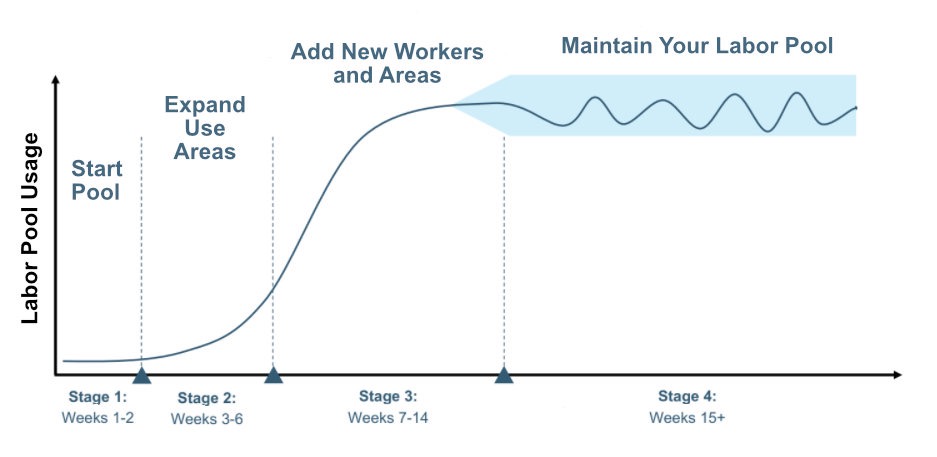
Building a labor pool typically unfolds in four stages. The steps below happen concurrently, not sequentially, and the overall timeline varies by the size and complexity of your operation.
Most operations will begin to notice the full effects of their labor pool somewhere between weeks 7 and 14. Smaller operations often see it even sooner.
As you get more comfortable with the platform, a few features are worth knowing about that will save your team time and give you more control.
Autofill automatically accepts bids that meet your criteria — minimum rating, max bid rate, and other requirements — without you having to manually review and approve each one. Once you've built a labor pool and know the caliber of workers you're working with, this removes a step from your process entirely. Learn more.
Bulk Post lets you post multiple ops at once from a saved template, across a date range you select. Instead of posting ops one by one for the week, you can queue them all up, review the summary, and post in one action. Requires a saved op template to use. Learn more.
YLP Tags let you organize your labor pool by skill, work area, shift preference, or proximity to your facility. When you post an op, you can target a specific tag group rather than your entire pool, which is especially useful for last-minute coverage. Learn more.
Blocking lets you prevent a specific operator from bidding on your ops in the future. If someone is not a fit, you block them in the Labor Pool tab and they won't appear on future postings. Learn more.
Create your free business profile and you'll be posting your first op within the hour. If you'd like our team to walk through your operation with you first, submit an inquiry below and we'll be in touch.



Create your free business profile and begin building your on-demand labor pool today.