
Flexible Scheduling for Employees. Coverage Control for Managers.
ShiftWorks gives frontline employees mobile access to schedules, shift updates, and absence reporting. Managers maintain full visibility and control through Workforce Management.
How ShiftWorks Keeps Coverage on Track
ShiftWorks connects frontline employees to your workforce plan. Employees manage schedules and communicate changes through the app while managers maintain control through Workforce Management.
Employees See Their Shifts
Employees access schedules and shift updates directly in the ShiftWorks mobile app, ensuring everyone stays aligned on upcoming shifts.
Supervisors Manage Shifts
Supervisors adjust schedules, manage absences, and update shift coverage through Workforce Management while employees receive updates instantly.
Operations Stay on Plan
Real-time visibility into attendance and coverage helps operations keep staffing aligned with production schedules and workload demand.
How Facilities Manage Scheduling and Shift Coverage Using ShiftWorks
ShiftWorks connects frontline employees and supervisors through real-time scheduling, attendance visibility, and mobile communication, helping operations teams maintain labor coverage as conditions change throughout the day.

Employees View and Manage Shifts
on Mobile Devices
Employees access their schedules through the ShiftWorks mobile app, where they can view upcoming shifts, receive supervisor updates, and manage schedule changes when conflicts arise. If an employee cannot work a scheduled shift, they can release it back to the team so supervisors can quickly identify open coverage and keep production schedules intact.
Frontline Supervisors Maintain
Shift Coverage in Real Time
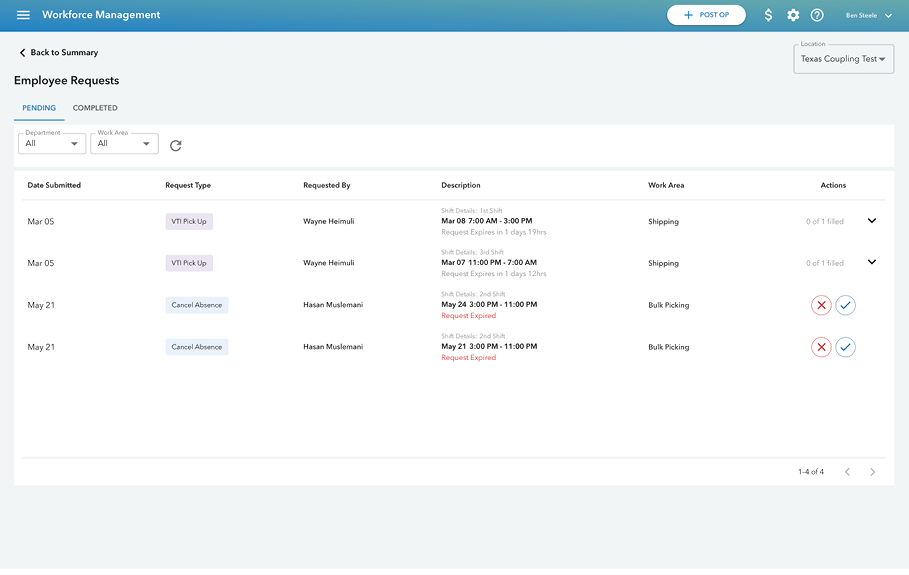
Supervisors use ShiftWorks to monitor shift coverage as the day unfolds. When employees report absences, release shifts, or schedules change, supervisors can quickly identify open coverage and reassign work before production is impacted, keeping staffing aligned in real time and preventing last-minute coverage gaps.

Operations Leaders Gain Full Visibility
Into Labor Utilization
ShiftWorks connects directly with Workforce Management so schedule updates, attendance changes, and labor activity automatically flow into workforce planning. As shifts are filled, released, or reassigned, operations leaders gain a clearer view of coverage trends, overtime exposure, and how labor hours are being used across the facility.
How Shift Release Works in ShiftWorks
ShiftWorks allows employees to release shifts they cannot work while supervisors maintain real-time visibility into coverage. As shifts are released and reassigned, Workforce Management automatically updates the schedule.
Employee Releases Shift
Employees can release a scheduled shift directly from the ShiftWorks mobile app when they cannot work it.
Shift Becomes Available
The released shift appears in the open shifts view so eligible employees can see available coverage opportunities.
Another Employee Claims It
Qualified employees can claim the open shift directly in the app based on the rules set by your facility.
Supervisors Maintain Control
All shift changes sync instantly with WFM, allowing supervisors to approve requests and monitor coverage.
Frequently Asked Questions
Browse through our most commonly asked questions related to ShiftWorks.
ShiftWorks gives employees visibility and control over their work schedules directly from their mobile device. They can view upcoming and past schedules, report absences, release shifts they cannot work, and claim available open shifts within the app.
When an employee reports an absence, releases a shift, or submits a request that requires approval, managers receive an instant email notification. All activity is also reflected in real time within the Workforce Management platform, providing visibility into attendance, open shifts, and pending approvals so supervisors can respond quickly..
Employees receive an invitation from their employer and can download the app in minutes. During registration they enter their organization’s code, verify their phone number, and create login credentials to access their schedule.
ShiftWorks is designed to be simple and intuitive. Most employees can navigate the app without formal training, and built-in guidance helps users understand how to view schedules, request time off, or release a shift. Optional onboarding resources are available for larger rollouts.
ShiftWorks can be configured to match your workforce policies. You can enable absence reporting, allow shift releases, or restrict shift pickup functionality depending on your operational requirements. These permissions can be managed at the organization or site level.
ShiftWorks is designed for frontline employees to manage schedules, communicate changes, and report absences from their mobile devices. Managers use Veryable’s Workforce Management platform to monitor attendance, approve requests, and maintain shift coverage across the facility.
ShiftWorks is designed to be simple and intuitive. Most employees can navigate the app without formal training, and built-in guidance helps users understand how to view schedules, request time off, or release a shift. Optional onboarding resources are available for larger rollouts.
Yes. ShiftWorks is available for download on both the Apple App Store and Google Play.
See ShiftWorks in Action
Schedule a walkthrough to see how employees manage schedules on mobile while supervisors maintain real-time visibility and control through Workforce Management.